Ross Patterson

Ross Patterson

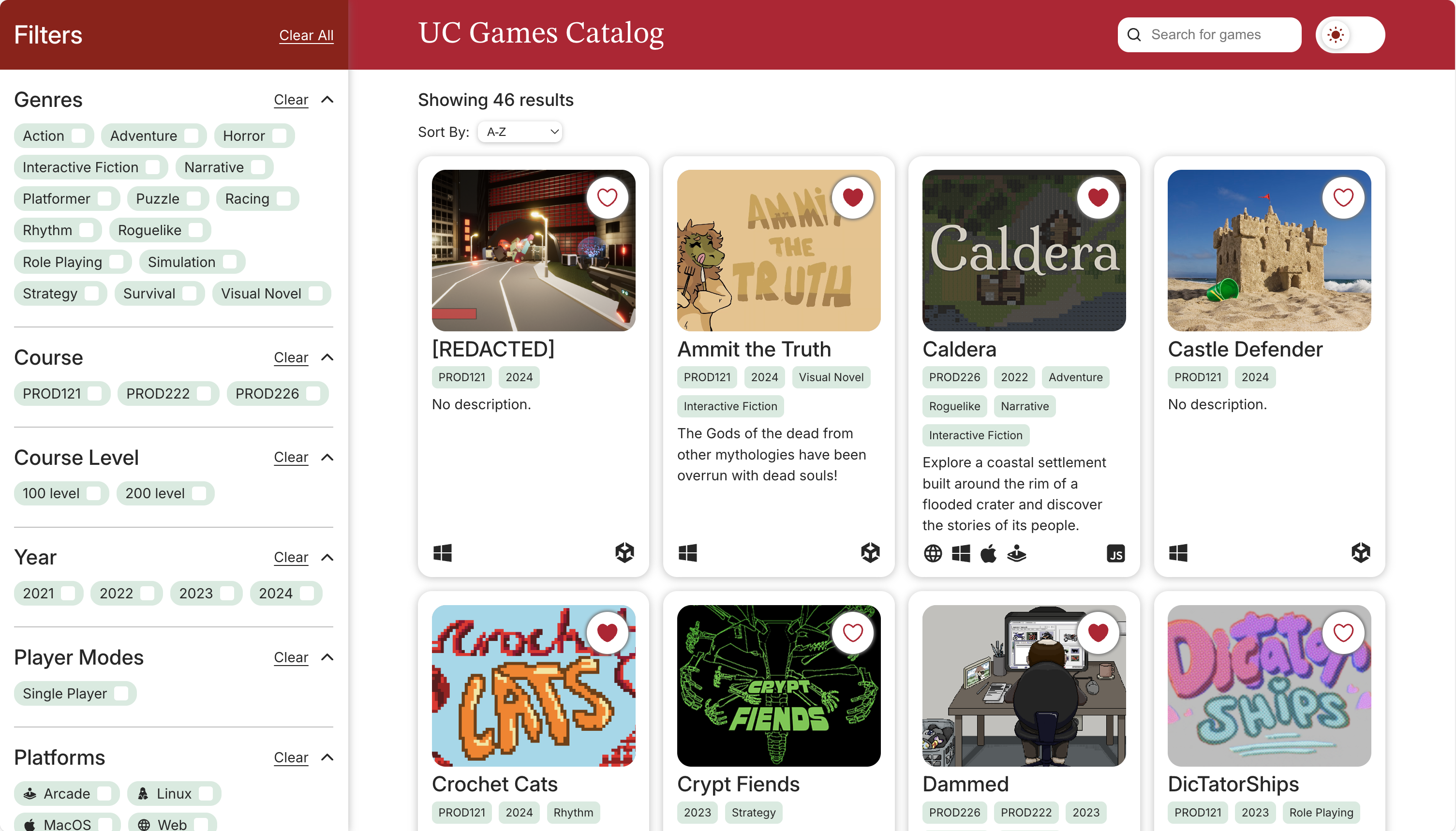
The Landing page of the catalog.

UC Games Catalog

A second-year group project from the University of Canterbury that is a prototype catalog to house all the games produced from various places over various years at the university.
About

  • A group project where a Web-prototype of a Games Catalog that houses games produced at the University of Canterbury.
  • Produced in Digital Product design for UC's Digital Screen and Game Development courses.
  • We worked with stakeholders to create a solution that targeted their needs- our stakeholders lack a place where all games can be found.
  • A front-end implementation, currently served with JSON files for the data loaded in using fetch requests.
  • The landing/home page lists all the games in cards. These can be filtered upon, searched through or sorted in different ways.
  • A second page is re-used for each game, which loads information and links to resources for each game. These pages can be accessed through the cards and bookmarked.

Details

  • Second-year University Project
  • Four Person Team
  • Front-end Web Project
  • 7-Week Project, starting in mid-July and ending in August
  • Built using React, using the Vite Plugin, with additional npm modules to create solution.

Project Timeline

Overview

Our Project consisted of six-week development sprint, with an additional week to prepare for finalisation and submission. Over these weeks our process included:

  • Meeting stakeholders regularly
  • Researching existing solutions
  • Producing ideas through ideation by combining stakeholder input with research
  • Scoping the project to create a sensible workload given time
  • Using Figma to produce basic interactive prototypes
  • Moving into Web Prototype using React to factor out the project into components
  • Supporting our front-end solution with a json data source to fetch game data
  • Adding functionality to the front-end to allow for functions such as filtering and searching
  • Applying changes to the prototype with user feedback and A/B testing

Getting Started

Understanding the Project

Before we met with stakeholders and got started with the project, we were given a brief with a broad criteria which we would need to refine with further stakeholder input and research. Some of the main requirements were:

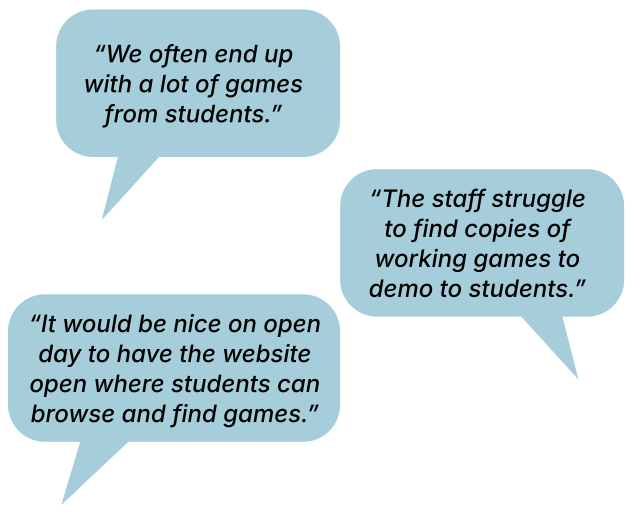
  • The University has hundreds of projects that have been produced over the years, with no easy way for staff (or students) to access and list all the projects produced.
  • The concept we produce must have ways to filter game metadata, such as year, course, genre and theme.
  • The ability to display information and media relating to the game, such as images, a description, and credits.
  • A plain-text metadata format for ease of potential hosting.

As a group we decided we would need to conduct research to examine what ways games can be filtered and listed by looking at similar solutions on the internet. We would also get input from stakeholders to understand what information would be best served in this catalog concept, and what filtering patterns would be most useful. In addition, a JSON format to store gamemeta data already exists at the University but is used for a different purpose. We decided we could adapt it to suite the needs of the project.
Moving Forward

Research: Purpose and Outcomes

For our research we looked primarily at three sites: Steam, Itch.io and the Meta Shop. Within these sites, we looked at different components and elements utilised to display and list games.

  • We chose these three sites as they all have a similar purpose: to "sell" and advertise games, list games in different ways with ways to search and filter through them, and provide a way display information about each game.
  • We focused at analysing, comparing and contrasting the usage of similar components, such as tagging, cards, listings, filtering, searching and sorting.

Stakeholder Input

We met with two different stakeholders to gain an understanding of how the catalog would be used and what it would need to do. These stakeholders were both staff members who oversee the teaching and facilitation of game development at the university so offer crucial insights for what our solution would need to resolve. Some important insights and needs of our stakeholders:

  • The games do not need to be playable. Instead, links can be provided to places where they are playable or where resources to download them are.
  • No overlays when hovering on cards. The information on a card should remain static and not change based on pointer or touch events.
  • Bookmarkable pages. The game page and landing/home page need to be separate to allow for bookmarking or sending links. On the gamepage, a different url parameter would be fine for loading different games.

We also regularly went back to our stakeholders through the development process so they could help form decisions and give us feedback on the prototype as it developed.

Ideation and Prototyping

We used ideas discovered in our research and combined them with our own ideas tailored to the project and stakeholder needs.
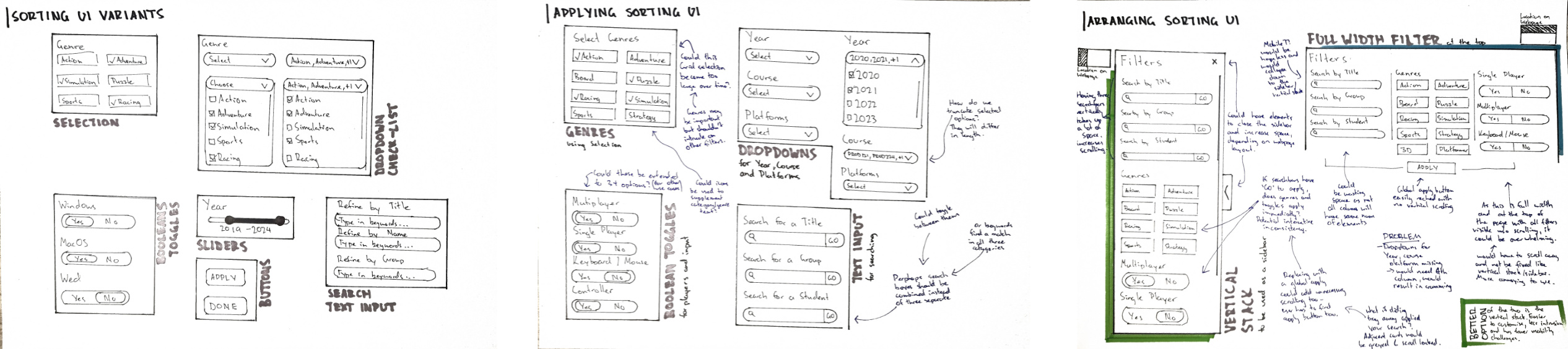
Ideation of sorting and filtering components
Individual ideas for filtering and sorting components.

Sketches

Each of us created ideation sketches for different parts of the prototype as paper sketches. This includes:

  • The Catalog/Home/Landing Page
  • The Game Page
  • Components for catalog listings, such as cards and filtering components.
  • Components for the game page, such as link modules, galleries, description and text sections.

During this process, I explored different ideas for cards and filtering UI and methods, and combined the most suitable ideas into a larger idea for a catalog page. I took a similar approach with the Game Page by first developing smaller components and variants and combining them into a larger idea.

We then converged our different ideas together to evaluate which parts would work best given the needs of our stakeholders and project requirements. In doing so, we created two "unified wireframes", one representing the catalog/home page, and the other being the game page.
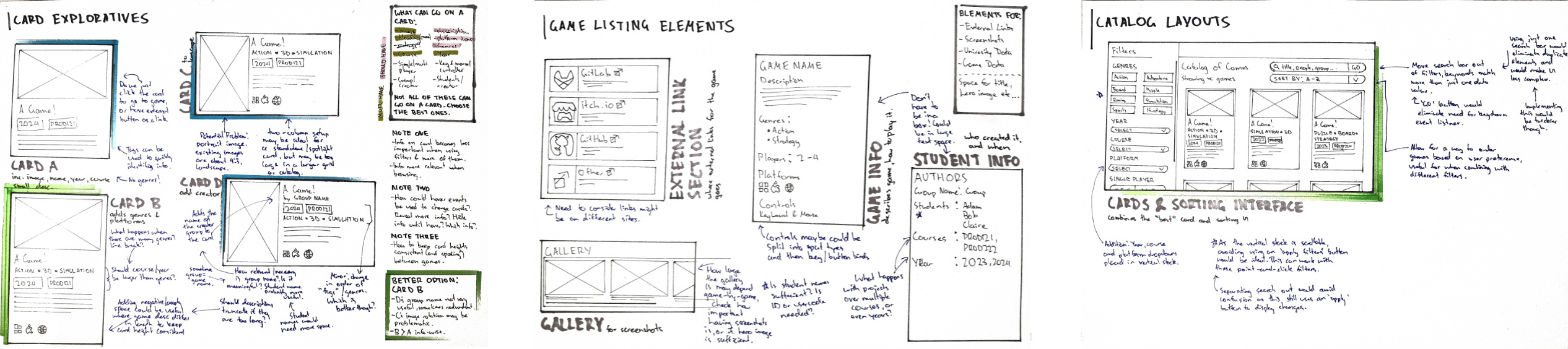
Ideation of filtering and sorting screen
"Assembly" of idealised components into a screen.

Figma Prototypes

We translated our unified wireframes and sketches into Figma Prototypes using the screens we had developed.
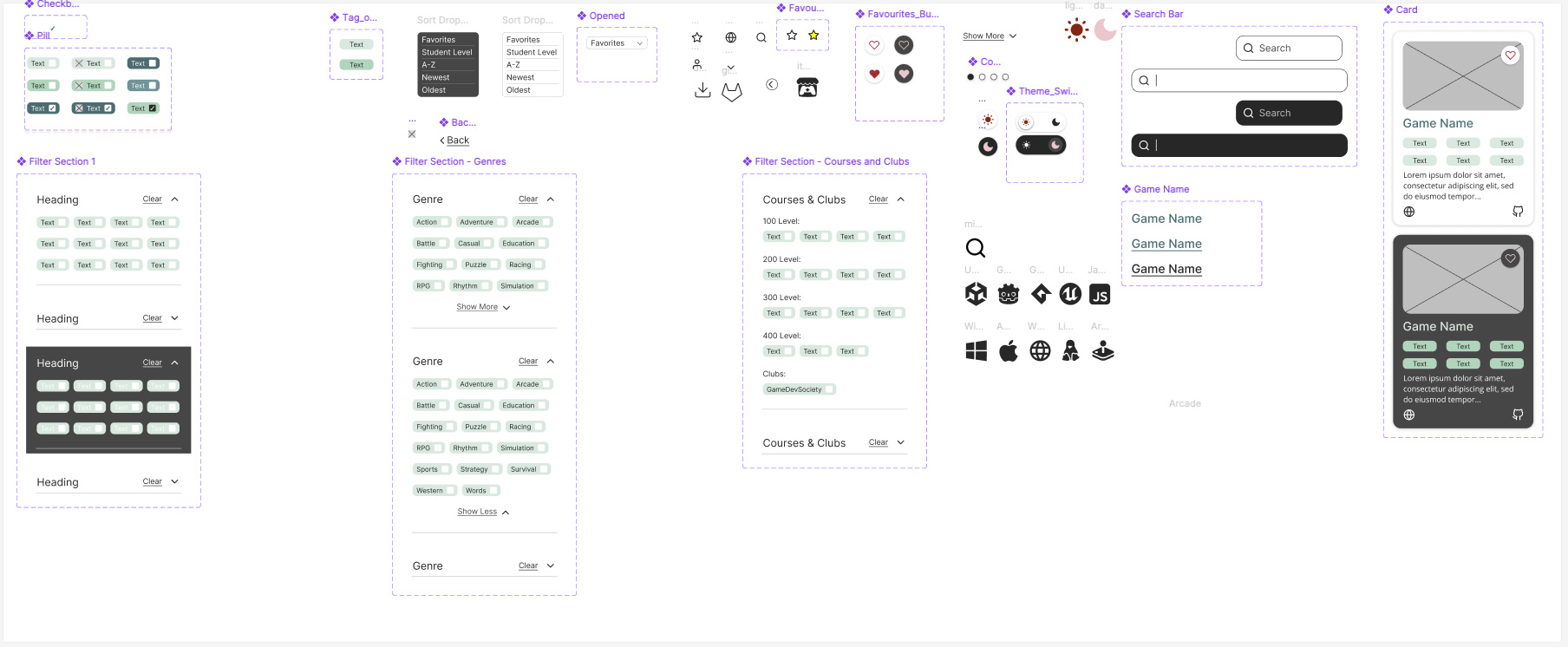
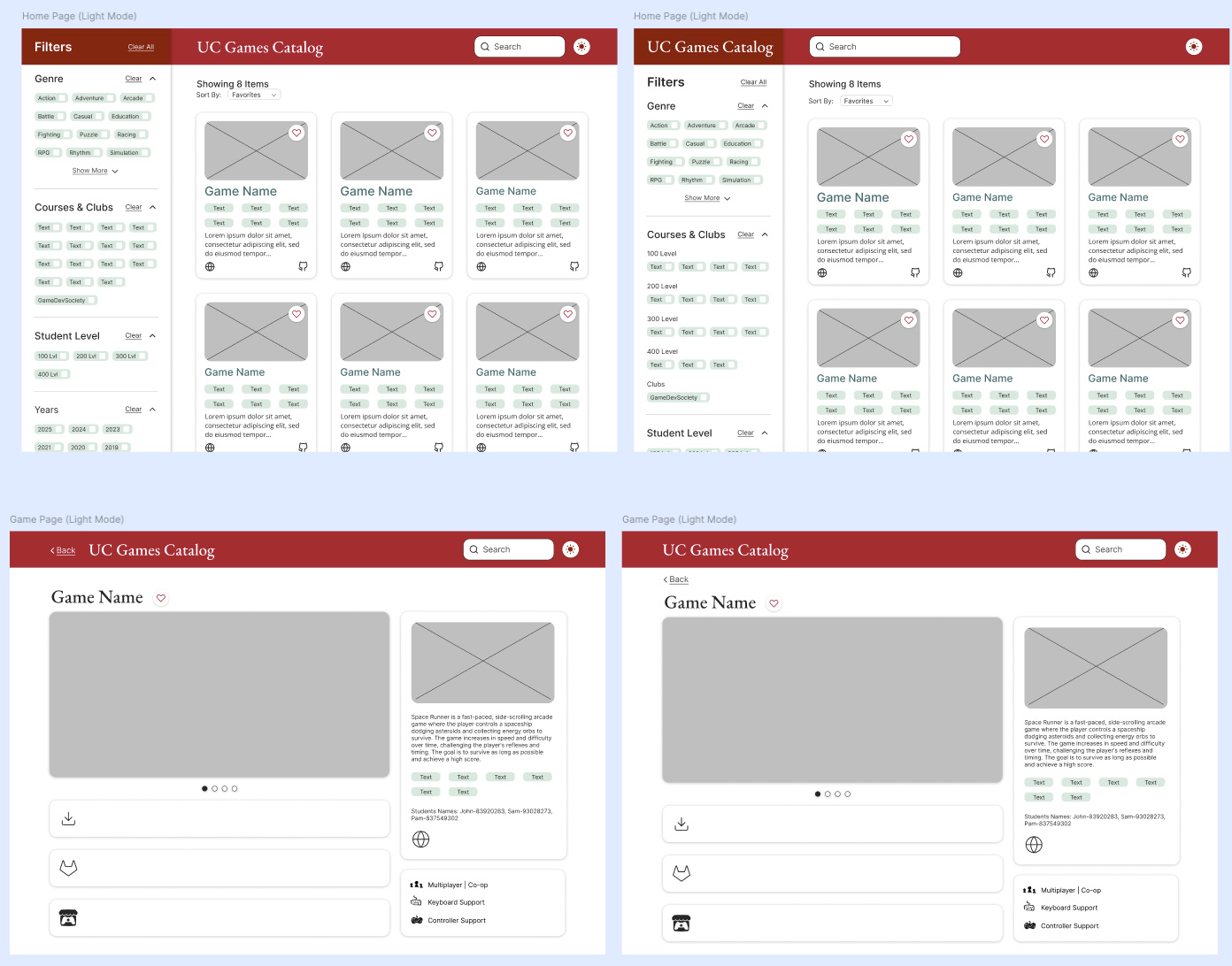
  • Compared to our paper wireframes, these prototypes allowed us to add in minimal interactions and functionality of the prototype.
  • Start modularising and breaking parts down into components that be useful when later moving into web prototyping.
  • Develop a selected and consistent colour palette that can be used across all components and pages.
  • Create a refined design language consisting of colour and typography that reflects UC's branding and is web suitable.
Figma Components
Figma Components
Figma Screens
Figma Screens

Web Prototyping

Choice of React

When we started web prototyping we chose to use the React framework for our prototype. This was for a few reasons.

  • Based on our previous Figma Prototypes, a lot of parts could be broken down into re-usable components. This would be ideal to speed up development and retain consistency throughout the prototype.
  • React offers "state management"- this would come in useful for the landing page that would allow for filtering, searching and sorting. It could potentially increase performance but also make development less complex.
  • From a personal perspective, all four of us had no prior experience using the React framework and wanted to explore it to expand our web skills.

Features and functionality

Our React prototype would be centered on two different pages. One would be the landing page, which would list all the games and offer a place for filtering and searching through games. The second page would be game page, where information, media and links to resources would be loaded for a specific game. This page would be re-used for each game in the catalog.
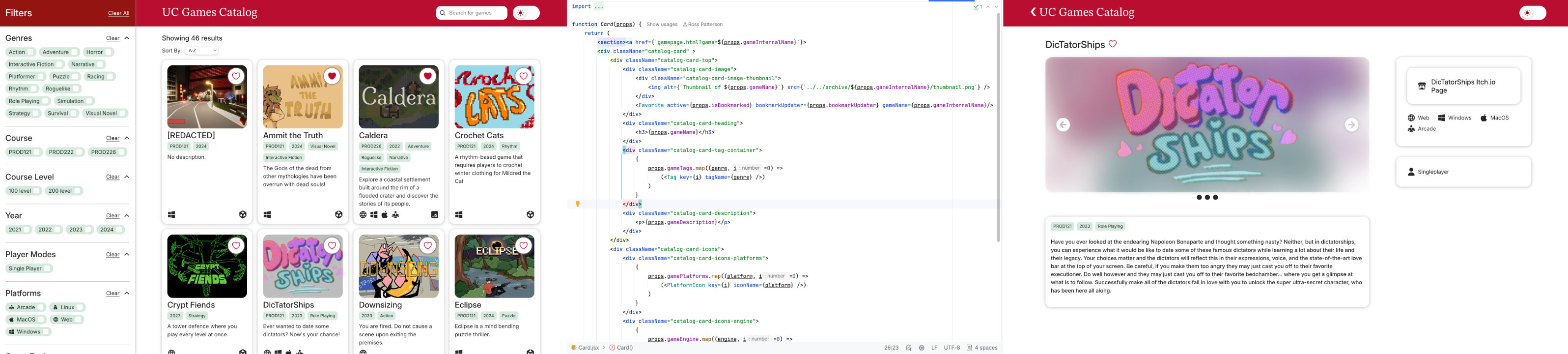
  • Dynamic filtering of the catalog through the use of React's UseState feature.
  • Favouriting through the use of browser LocalStorage for customisable usage on a user by user basis.
  • Searching within the listings was achieved using Fuse.js, an npm library used for efficient searching. The results of the search are applied to the catalog React state.
  • Quick links to game assets and resources alongside descriptions and people involved in the information for each game.
  • Easy to understand and expandable data format with a structured and template json format for storing metadata.

My Major Roles in Web Prototyping

As this was a group project, we all contributed to the project in various ways. This was mainly decided based on our interests and strengths. My main responsibilities:

  • Creating async functions to open and read one or all the json files that store game metadata, and parse them as JavaScript objects.
  • Create functions for filtering by attaching filter buttons to a singular function that manages the React state of the listings.
  • Use LocalStorage to allow for games to be added or removed to favourites by clicking on a favourites button for each game.
  • Use the React state to implement sorting of different types, such as by year and alphabetical order.
  • Add a function to decompose the url of the game page to load a specific game using a url parameter.
  • Creating certain React components and page structures, alongside the other group members.

User Testing

Participants

We had four participants in our user testing who were game development students from the University. This was fitting, as these people frequently work with games and would be end users if the prototype were ever to be deployed.

A/B Testing with Filters

One thing we had in mind for testing was the way in which our filters functioned.

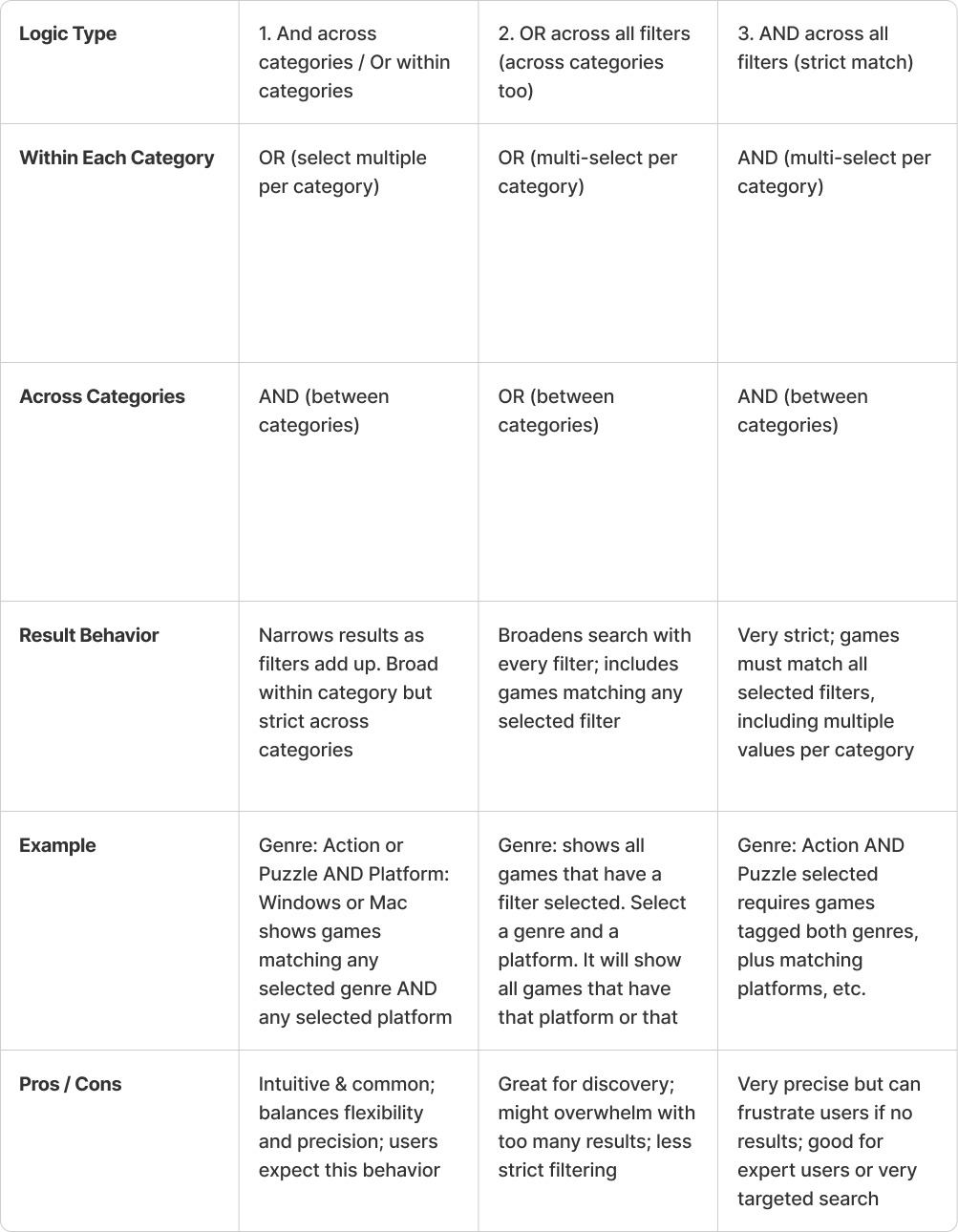
  • We identified three different ways in which filters could be applied. This was because we have different categories under which filters can be applied, and multiple values for them.
  • Filters consisted of categories such as "Genre", "Year", "Course" and so on.
  • We tested two different methods of filtering without informing our testees of this change.
    • The first method was a broad way of filtering games. For a game to be displayed in the listing, it had to have at least one of the selected values, across any filter category.
    • The second method produced narrower results. A game had to have at least one of the selected values under each category with selected values.

We believed prior to testing the second method would more likely be favoured. Sure enough, user testing confirmed this. The testees were confused how more games started appearing when multiple values across categories were selected, because they were trying to find a game using a specific criteria.
Further Feedback

Something else valuable we realised with this research is that we aren't game experts, despite our discussions with our stakeholders. This was important for a few reasons:

  • A lot of UI/UX decisions made reflected our own backgrounds in more generally applied web design and development.
  • Our testees commented on how we broadly applied "Genre" filtering- our testees stated that usual game genres are based on smaller selection and supported by another category, such as theme.
  • One participant thought the favouriting symbol should use a start rather than a heart, because of a heart's association with hitpoints in the game-world.

Development should always consider the end-user, even for the small things that may go overlooked.

Retrospective

Looking back this was largely a successful project for a few different reasons.

Delivery Perspective

  • A prototype was delivered that demonstrates a viable solution and vision that meets the needs of the university.
  • Though it is not production ready, it is a foundation that could absolutely be expanded upon so it could be hosted by the university.
  • Further improvements would need to made, such as mobile portability.
  • With a proper independent backend, constraints could be added to valid metadata and automation could be added so that data could be updated or added in the gui.

Learning Perspective

  • This was the first time any of us used React. We learned and effectively used its component driven structure well.
  • In the future, we would need more time to understand the interaction and state management parts of React.

Group Dynamics

The four-person team I was part of was worked together very effectively.

  • We each played to our strengths and worked on different parts of the web prototype that reflected these.
  • Our regular in-person communication and meetings helped establish group expectations and dynamics that helped deliver and reach milestones.
  • Milestones, goals and tasks were clearly established with a timeline for when they should be delivered.